Guide for Certificall Beta Testers
Welcome to the Certificall Closed Beta Testing Program!
As a selected beta tester, you will have exclusive access to our latest features before their official launch. This guide will explain how to access the beta version of the Certificall application.
Accessing the Certificall Beta Version
After being invited by email via Google Play Console or App Store Connect, follow the instructions below to download the beta application.
For Android Users:
- Accept the Invitation: Open the invitation email sent via Google Play Console and click on the invitation link.
- Go to the Application Page: The link will redirect you to a Google Play page where you will need to accept becoming a tester. You can directly access the Certificall Google Play Store page or by clicking here.
- Join the Testing Program: Scroll down the page and click "Become a tester" to join the testing program.
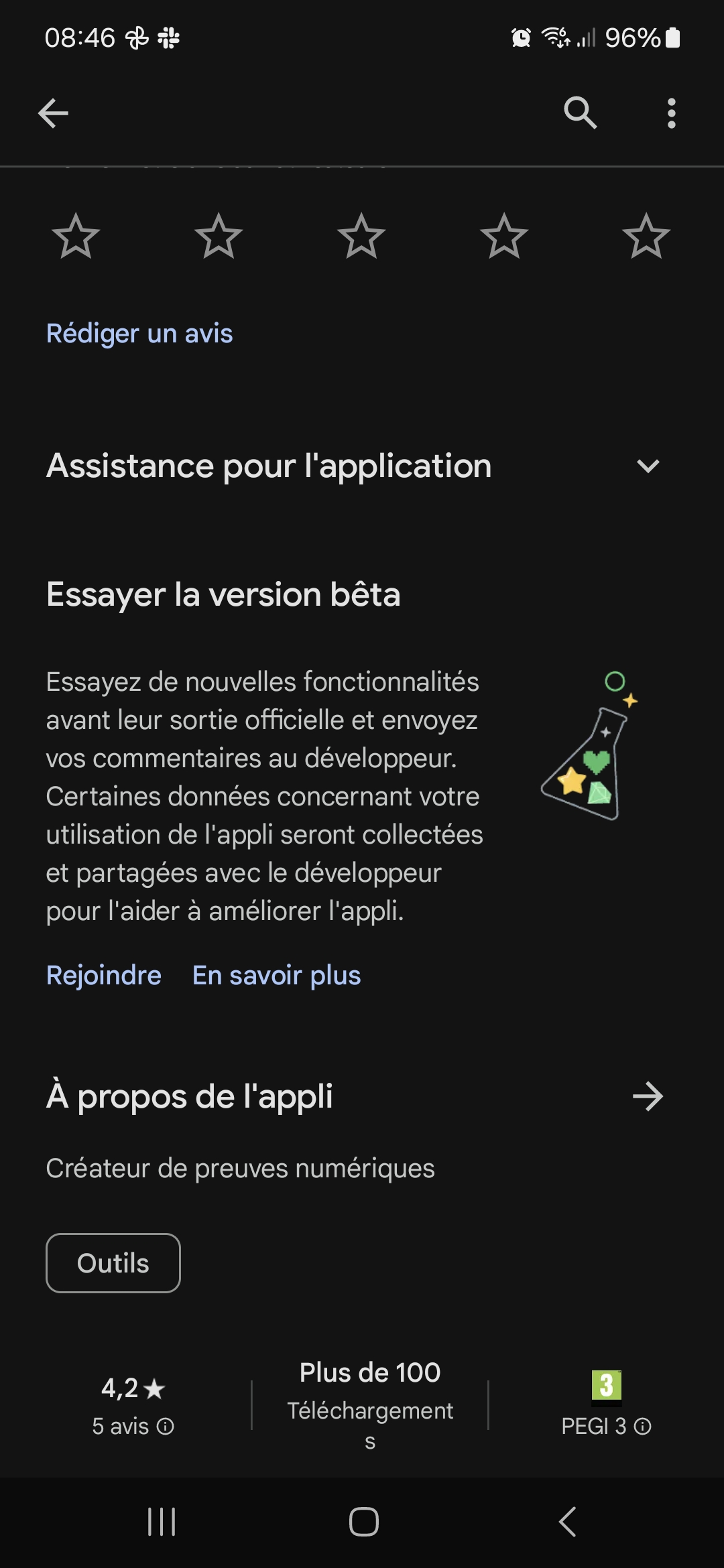
- Download the Application: After accepting, you will have access to the download link for the beta version of the application on the Google Play Store.
- Start Testing: Download the beta application and begin your testing experience.
For Users Invited to the Beta via Internal Sharing:
For users invited to test a specific build via internal sharing on Google Play Store, follow the steps below to enable this feature and access the application:
- Access the Google Play Store App: Open the Google Play Store application on your Android device.
- Open Settings: Tap the menu (the three horizontal lines) and go to "Settings".
- Enable Internal App Sharing:
- In the "About" section, tap seven times on the Play Store version.
- Once the internal app sharing setting appears, go to the General tab > Developer Options
- Tap "Enable".
- Download the Beta Application: Go to the Certificall internal sharing link (note that this link may not contain the latest version of the application) and download the application.
For Apple (iOS) Users:
- Download TestFlight: Make sure the TestFlight application is installed on your iOS device. It is available for free on the App Store.
- Accept the Invitation: Open the invitation email sent via App Store Connect and click on the invitation link.
- Open TestFlight: The link will open the TestFlight application on your device, giving you access to the beta version of Certificall.
- Download the Beta: Follow the instructions in TestFlight to download and install the beta version of Certificall.
- Start Testing: Launch the application and explore the new features.
Share Your Feedback
Your contribution is essential in helping us improve Certificall. Please share your feedback and suggestions directly through the application, or contact our support team via the email provided in your invitation.
We thank you for your participation and your valuable help in the development of Certificall.